Wait a minute, Claude Code isn’t just for developers?
You heard right. HR teams, marketing teams, and even sales teams are using Claude Code to automate the boring and repetitive parts of their jobs. Why shouldn’t CS join them?
While Claude Code was built with developers in mind, you don’t even need to know how to write a line of code to use it. In this guide, we’ll give you a primer on what Claude Code is and how to use it, and share downloadable Claude Skill files you can use today.
What is Claude Code?
Claude Code is Anthropic’s agentic AI tool, the keyword there being “agentic.”
Claude in the browser responds to one prompt at a time. You ask a question, it answers. Rinse and repeat. Claude Code can take a project with multiple steps and work through it autonomously.
That means it can write and run code, process data, and connect to external tools without you having to provide much direction. If those tools offer an MCP (model context protocol) server — like Vitally does — then Claude Code can even “use” your favorite software for you. The best part is you can just describe what you want in plain English, and Claude will take care of the rest.
Claude Code relies on “Skill” files, which are special instructions that guide it to complete tasks. We’ll cover those in detail next.
How to Upskill Your Claude Experience
When you open Claude in the browser and ask it a question, a process kicks off behind the scenes to guide its responses. This is called the “system prompt.”
Think of a Claude Skill as a way to override, or at least narrow, the system prompt to give you a much more refined output than you’d get with Claude “out of the box.”
Claude Skills are a combination of:
- Markdown files (plain-text files with special formatting) that provide detailed instructions for Claude to complete a task.
- Scripts for running complex tasks with code or to call APIs to retrieve data.
- Templates for the output you want to create.
- References and other materials Claude will need to run the skill.
Your instructions can be as detailed as you want, and you can incorporate any type of data you can imagine.
And you don’t need to create them yourself. When you chat with Claude Code, it can create Skill files to help you complete tasks. Claude can even “chain” these skills together for more complex tasks, like pulling data for churn analysis or creating a QBR deck.

Why Use Claude Code Instead of Claude or Cowork?
Other than Claude Code, the two you’ve probably heard of are Claude (in the browser) and Claude Cowork. It’s easy to get lost between these three, so here’s how they differ.
Claude.ai is a browser-based chat tool that is great for answering questions or completing simple tasks, such as drafting an email or summarizing a transcript. Most CS teams start here, and for a lot of everyday tasks, it’s exactly what you need.
Claude Cowork is a desktop-based application that can run more complex tasks than the browser-based version of Claude, access files on your desktop, run scheduled tasks, and even interact with your browser.
As we mentioned earlier, Claude Code is the agentic side of Claude’s tools. It allows you to connect to live tools, process datasets, handle multi-step workflows, and even build simple self-hosted applications. It has a steeper setup than the other two, but it also has a much higher ceiling.
Here’s how we’d think about the decision to use these three tools:
- Use Claude.ai when you need to do one thing (draft, summarize, brainstorm, answer).
- Use Cowork for simpler agentic tasks and creating documents.
- Use Claude Code when you need to analyze data at scale, connect to your live tools, or automate a multi-step workflow.
CS teams today operate across systems that spread data far and wide, leaving room for gaps in your view of any one account. Claude Code can help you bridge these gaps by bringing your data together for deeper analysis and complex tasks.
How to Download and Use Claude Code – No Code Needed!
Claude Code is much easier to set up than you’d think.
We recommend using VS Code, a desktop application for writing and managing code files. Don’t worry, you don’t need to write any code here – Claude will do everything for you.
Head to the VS Code website and download the version compatible with your computer. Then, open the Extensions tab in VS Code, search for “Claude Code,” and install the official Claude Code extension (there will be a bunch of other options, but only the official extension is Claude Code for VS Code).
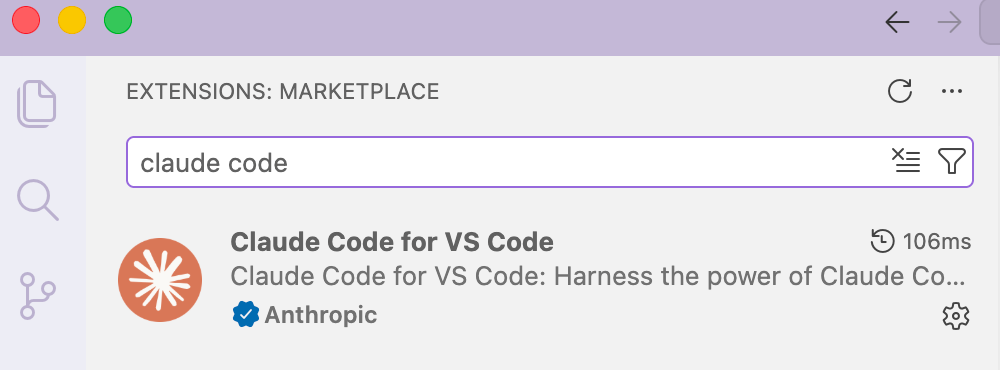
Optionally, you can also download Claude Code for VS Code from the Claude Code Docs website. Once Claude Code is installed, log in, and you are all set to start chatting.

5 Ways CSMs Can Use Claude Code
Below are our five favorite ways for CSMs to use Claude Code to automate key parts of their job. For each section, chat with Claude in VS Code just as you would in the browser; the difference is that you’re going to ask it to help you create a Skill you can use again and again.
Pre-Call Account Brief
Pre-call prep is one of the biggest time sinks in a CSM’s week. Between digging through your CRM, pulling recent support tickets, checking product usage, and skimming the last few email threads, 20 minutes can disappear before you’ve written a single word.
Claude Code can turn that into a two-minute task. Ask Claude Code to create a Skill file that can take in the following information:
- Renewal date
- Last interaction
- Open action items
- Usage highlights
- Red flags
- Context about your role and what you want to see surfaced
Then, before a call, paste in what you have on the account, and Claude Code will generate a structured brief you can scan on the way into the meeting.
Remember: the output is only as good as the information you put in. If you have decent notes in your CRM and a few recent data points, this skill pays for itself on the first use. And if you’re running your accounts in an AI-powered CSP like Vitally, the product usage data, health scores, and interaction history are already in one place, which means feeding the skill is a matter of copying from one dashboard instead of five.
Post-Call Follow-Up Email
Here’s a scenario that probably feels familiar: you end a call with good intentions, three pages of rough notes, and a calendar notification for your next meeting in 12 minutes.
When’s that follow-up email going to be written? Automate that with a Claude Skill that takes in the following:
- Call notes
- A transcript, if possible
- Account notes
Chat with Claude Code and give it a detailed set of instructions, including room to copy and paste the above data, to turn it into a polished email with a recap, clear action items, and a warm closing. Make sure to paste the raw transcript or call notes rather than summarizing first. The more material Claude has to work with, the better the output.
QBR Preparation
Every CSM knows the core story they want to tell, but translating that into a polished narrative that gets buy-in is a different story. Automate it by having Claude Code chain a series of Skills that can help you prepare, catch up to speed on changes with your account, and create a deck from a template.
Feed the following information:
- Your product’s core value pillars
- The QBR structure your team uses
- Specific instructions to lean on the actual data you provide rather than making things up.
When it’s time to prep, you paste in usage highlights, key wins from the quarter, open risks, and expansion goals, and Claude builds out a first draft. It won’t write the whole QBR for you, and it shouldn’t. What it does is handle the structural work so you can spend your time on the part that only you can provide: the human-driven relationship with your account.
Churn Risk and Renewal Prep
Most Customer Success Managers have a sense when an account is at risk before they can fully articulate why. You just need structure to make these insights actionable.
A churn risk and renewal prep skill helps you translate what you’re sensing into something you can act on and communicate clearly. Load the following data:
- Product usage
- Support conversation sentiment
- Health scores
- NPS and other survey data
- Any other signals you’ve flagged as churn risks
Before a renewal meeting or a check-in, paste in what you’re observing: usage data, recent support interactions, engagement patterns, and any personnel changes on their side. Claude Code will handle the rest, giving you a set of talking points for the renewal conversation, including the harder ones. Pro tip: Connect Claude via MCP with an AI-native Customer Success tool like Vitally to make this process even easier.
Proactive Outreach
Proactive outreach is one of the highest-value things a Customer Success Manager can do. It’s also the first thing to go when your day fills up with reactive work.
A proactive outreach Skill reduces that friction for you to a matter of button clicks. First, decide what type of outreach this is (onboarding check-in, milestone notes, feature announcements, re-engagement nudges), and feed Claude Code with information about the account and past top-performing emails. When it’s time to reach out, you drop in the account context and get a draft in seconds.
To be clear: this isn’t “AI sends emails for you.” You’re reviewing every email before it goes out. You’re still the one building the relationship. The Skill just removes the blank-page problem, so the email actually gets sent.
3 Ways CS Leaders Can Use Claude Code
Claude Code isn’t just for CSMs; CS leaders can use AI too. Don’t worry, we’re not asking you to fall asleep at the wheel and let AI manage your team. AI can help you spot coaching opportunities and give you better coverage across your team, so you can focus on what you do best.
Try using Claude Code for the three tasks below.
Set up a Weekly Portfolio Briefing
Staying current on a large account portfolio means constantly switching between tools to build a picture that should already exist. Renewal dates are in your CRM, open support issues are in Zendesk, and your team has three Slack channels.
With Claude Code and connections to your tools, you can run a weekly portfolio briefing automatically. We’d recommend starting with accounts renewing in the next 90 days, flagged with risk signals (like days since last engagement, open support tickets, or NPS) so you can help your team get ahead of any churn risks.
An AI-powered Customer Success Platform like Vitally makes this even more powerful by bringing all of your customer, product, and sales data under one roof for Claude Code to access and analyze in one briefing.
Build a Renewal Risk Scoring Model
Your CSM team can only prevent churn if they have the right risk signals to watch for. Otherwise, every renewal flies blind.
This is a prime use case for Claude Code. Upload historical data from your churned accounts: usage trends in the 90 days before churn, support ticket volume, last QBR date, days since last CSM touchpoint. Ask Claude Code to identify the patterns that consistently preceded churn, and have it build a scoring rubric you can apply to your current portfolio.
Here’s a quick sample prompt you can use:
“Here is data from my last 25 churned accounts. For each, I’ve included: usage trend in the 90 days before churn, support ticket volume, last QBR date, and days since last CSM touchpoint. Identify the patterns that appeared most consistently before churn and build a risk scoring rubric I can apply to my current accounts.”
Claude Code will turn raw data into a data-driven risk model built from your actual customers.
Automate Sales to CS Handoffs
So much of Customer Success hinges on the big events: onboarding, renewals, and QBRs. Handoffs are just as critical, and they’re often a time when early churn risks can pop up if you know what to look for.
Your CSMs are wasting valuable minutes with customers by asking the usual “so tell me about your business” type of get-to-know-you questions. Rather than have CSMs force new customers to rehash everything they said during the sales process, why not use AI to speed up the handoff?
Tap into your CRM data with Claude Code to create a brief for every new account entering onboarding. You can even identify early risk signals buried in SDR calls that your CS team can be on alert for from the get-go to stop churn in its tracks.
Across the eight tasks above, you can cut hours from your team’s week, freeing up your CSMs for high-value relationship-building work. We’ve got a special offer for you, though – we created a Claude Skills library that you can download and use right away.
Automate Your Workflows With These Claude Skills
Claude Code is a super-powered version of Claude's browser-based version, but it’s still only as good as the instructions you give it.
Those special instructions are called Skills, the Markdown files that Claude uses to guide its outputs. The above is a taste of what you can do with Claude Skills. We turned the above skill descriptions into detailed Markdown files that you can download and save to guide Claude Code on your computer.
Click the button below to get a link to the files, save them, and start automating your work so you can focus more on building relationships with your top accounts.
Table of Contents
Request a Demo

Request a Demo
Request a Demo