Sure, AI speeds things up and saves you valuable hours, but is it worth it if you don’t trust it?
That’s the real problem with AI. No one is going to say that prompting ChatGPT to write you a follow-up email is slower than writing it yourself. But if the outputs aren’t great — or worse, dead wrong — then there’s a problem.
AI can be effective when used in the right way. Below, we’ll share tips on how to get the most out of AI for your CS workflows.
Where and How AI Goes Wrong
To understand why AI gets things wrong, let’s take a step back to look at how AI works. Don’t worry, you don’t need a PhD to understand this; we’ll make it as simple as possible.
Generative AI is powered by Large Language Models (LLMs), which are machine learning models trained on text, images, and videos – lots of them. OpenAI and Anthropic scrape content from across the web to feed their models so they can generate better outputs.
This is why the latest models are better than the ones released in 2023. They’re trained on more data, used by more people, and are making “smarter guesses” as a result.
That’s what’s really happening under the hood: they’re guessing.
When you write a follow-up email after a call, you’re processing the call, the customer’s tone, the agreed outcomes and next steps, and the account history and their ARR. When you ask an AI model to generate a follow-up email, it’s essentially guessing at the most likely thing you’d want. Sometimes this is really good, and other times it lacks the important context that would give you a valuable response.
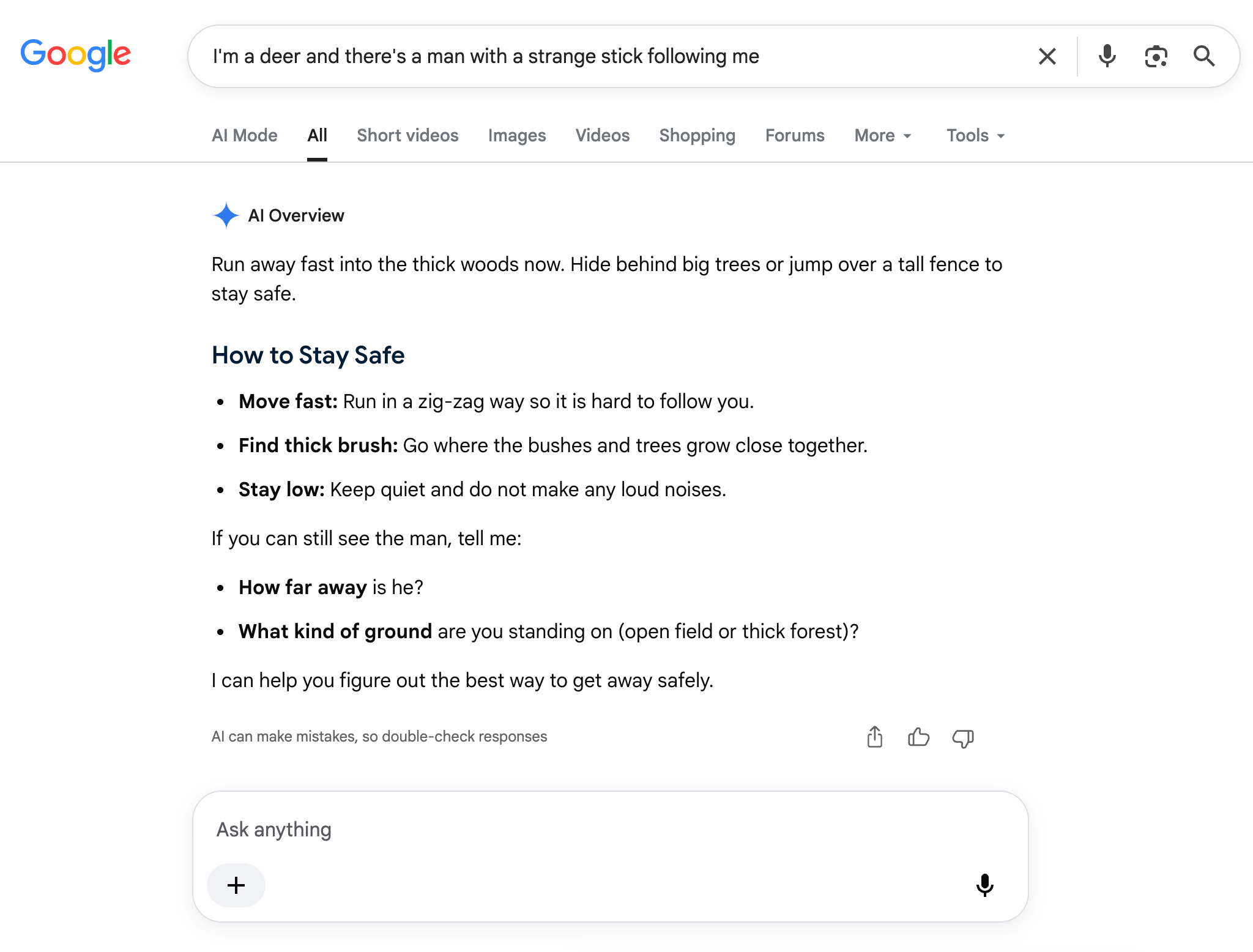
This is where “hallucinations” occur. Because the AI lacks context, it makes things up because it’s designed to give you a response, no matter what. These models also lack human judgment and logic, as evidenced by the image below:
AI promises time savings, but when you’re spending time fixing AI outputs, re-prompting, and waiting for a response, those time savings disappear quickly. A study by Workday found that the average employee spends 1.5 weeks per year fixing AI outputs, and 37% of the time saved by AI is offset by rework.
Getting value from AI starts with preventing those bad outputs. And that starts with proper context and better guardrails.
How to Get Better Outputs From AI
Without proper context and guardrails, you’ll get subpar responses from AI tools that end up taking more effort to fix than if you’d done everything yourself in the first place.
That doesn’t mean AI isn’t valuable. You can improve your responses by doing the following:
- Provide the full context
- Go beyond basic prompts
- Use the right tools for the job
Provide The Full Context
Without context, AI will always be confidently incorrect.
As a CSM, you have the full context for every account. You’ve been on every call, read every email, and can probably recite health scores by heart. By default, ChatGPT or Claude won’t have that. And without that context, they’ll respond the most generic and bland way possible.
That might be fine for a low-stakes email, but for a Hail Mary to save a top account, it’s not even close to good enough.
So give AI the full context. Export the data you can to present a larger picture that includes revenue data, product usage data, support data, and transcripts from your calls. This won’t make the AI responses perfect – you’ll still need to give them a once-over – but it will give AI more context to tailor its responses around.
Gather your key data and find a way to import it to your AI tool of choice. That’s your first step, but there’s more to it than that.
Go Beyond Basic Prompts
“ChatGPT, write me a follow-up email” is so 2023.
You can do more than run basic prompts in Claude or ChatGPT. AI has gotten more sophisticated in the past few years, and the ways you can use AI have evolved far beyond simple prompt boxes.
For instance, you could use Claude Cowork to interact with your browser, connect to APIs, and access and create files directly on your desktop. Or you could use Claude Code to automate entire processes, and you don’t even need to write a single line of code to do it.
To use Claude Cowork and Claude Code effectively, you’ll need to create Skill files. These are Markdown files that instruct Claude on how to think, act, and respond. You can be as detailed as you’d like to train Claude to respond exactly the way you want; it’s a much better way to use Claude than prompting it “out of the box.” Feed AI contextual data, and use AI to its fullest capabilities to string tasks together and automate more complex processes.

Use the Right Tools for the Job
Downloading a call transcript is one thing, but connecting Stripe, HubSpot, Intercom, and your product usage data is another.
You may not get full buy-in from your security team to download all of that onto your computer, but with a Customer Success Platform that can connect to all of your data sources and bring them under one roof, you can.
A Customer Success Platform (CSP) brings all of your customer and communication data together. It allows you to review accounts, track health scores, and report on your KPIs in customizable dashboards. Think of it like a CRM, but built for Customer Success and not Sales.
Some Customer Success Platforms, like Vitally, even offer powerful native AI features that can fuel your CS motions.
Vitally AI turns unstructured data into actionable insights for your team. With Vitally, you can ask questions about your data and receive contextual answers, record and analyze call transcripts, and generate tasks and follow-up emails for accounts on the fly.
You don’t have to limit yourself to Vitally’s UI; with Vitally MCP (Model Context Protocol), you can connect Vitally to your AI tool of choice and prompt like you normally would. Let Vitally handle the data collection and integration, and run your prompts and Skills in Claude.
Use AI For the Work You Dread, Not the Work You Do Best
The real difference between using AI effectively and wasting time babysitting ChatGPT is knowing what to do yourself and what to delegate.
Delegate the tedious, repetitive work that slows you down every week. Things like:
- Drafting routine emails
- Summarizing call notes
- Formatting decks
- Pulling together reports
In other words, the stuff that you could do before your first coffee in the morning when you’re still half asleep. These tasks don’t make you more valuable for your clients or your team, and delegating them to AI frees you up for more important work that requires your judgment, like building trust with accounts and deciding how to act based on your data.
Take a Major Step Toward Better AI Outputs With These Claude Skills
AI can be effective, but it needs context and guardrails. You can provide the context with your customer and business data, but you still need to create guardrails to point your AI tools in the right direction.
For that, you can use Claude Skills.
Claude Skills are Markdown files that tell Claude how to think, act, and respond. In other words, you can control how Claude responds to your prompts and the outputs it returns. The best part is, you don’t have to write these Skills yourself; we wrote them for you. We created a Skill library specifically for Customer Success. Click the button below for the following Claude Skills:
- QBR prep
- Pre-call account brief
- Post-call follow-up email
- Churn risk and renewal prep
- Proactive account outreach
Click the button below to get a link to the files, save them, and start automating your work so you can focus more on building relationships with your top accounts.
Table of Contents
Request a Demo

Request a Demo
Request a Demo