
Is your idea of using AI just a matter of chatting with Claude to edit or even draft emails to your top accounts?
You’re making a big mistake. Not because that’s a “bad” use for AI. It’s just that AI can do so much more for you than generate basic content from a prompt.
Claude Skills are an incredibly powerful way to customize Claude's output, allowing you to offload more tasks to AI while keeping the human-driven aspect of your role as your primary focus. But they’re technical. You need to set up folders and create SKILL.md files to run them, which can scare away all but the most tech-savvy CSMs.
In this guide, we’ll share five Claude Skills worth building if you’re a Customer Success Manager looking to reclaim your week.
What are Claude Skills?
When you open Claude in the browser and ask it a question, behind the scenes, a process kicks off to guide how it responds and operates. This is called the “system prompt.”
Think of a Claude Skill as a way to override, or at least narrow, that system prompt to give you a much more refined output than you’d get by using Claude “out of the box.”
Claude Skills are a combination of:
- Markdown files (plain-text files with special formatting) that provide detailed instructions for Claude to complete a task.
- Scripts for running complex tasks with code or to call APIs to retrieve data.
- Templates for the output you want to create.
- References and other materials Claude will need to run the skill.
Your instructions can be as detailed as you want, and you can incorporate any type of data you can imagine.
Are Claude Skills Really Necessary?
If you want to get the best possible outputs from Claude, absolutely.
Rather than open up Claude and ask “please generate a renewal email to this account,” you can create a “renewal management skill” that takes in usage data, product limits, subscription history, feature adoption, and your product roadmap to craft a hyper-personalized renewal email based on that account’s usage and product adoption.
You can also “chain” skills together, which is a fancy way of saying you can ask Claude to follow a set sequence of skills in order. For example, you could write a Claude Skill that takes in product data from the past six months to analyze trends, another to review support ticket data to analyze sentiment, and a third to generate a QBR deck.
While you could copy and paste data and manually prompt Claude in the browser, breaking your process down into distinct steps and creating skills to implement them lets you quickly create a repeatable process you can execute for every account.

How to Create and Use Claude Skills
If you can write in Google Docs and move files into a folder, you can create a Claude Skill.
First, take a step back to review your workflow. If you’re writing a skill for renewal emails, then break down the steps you work through and the data you use to guide you. That could look like:
- Collect usage information
- Review usage against limits
- Check for feature adoption
- Analyze previous calls and sentiment around renewing and possible upsells
- Draft the email
- Edit for clarity
A Claude Skill is only as helpful as the information you can provide for the exact sequence of steps to work through. Once you have that, you can create your skill by working through the following options:
- Create them in the browser version of Claude
- Create them on your computer for Claude Code or Cowork
How to Create and Use Claude Skills in the Browser
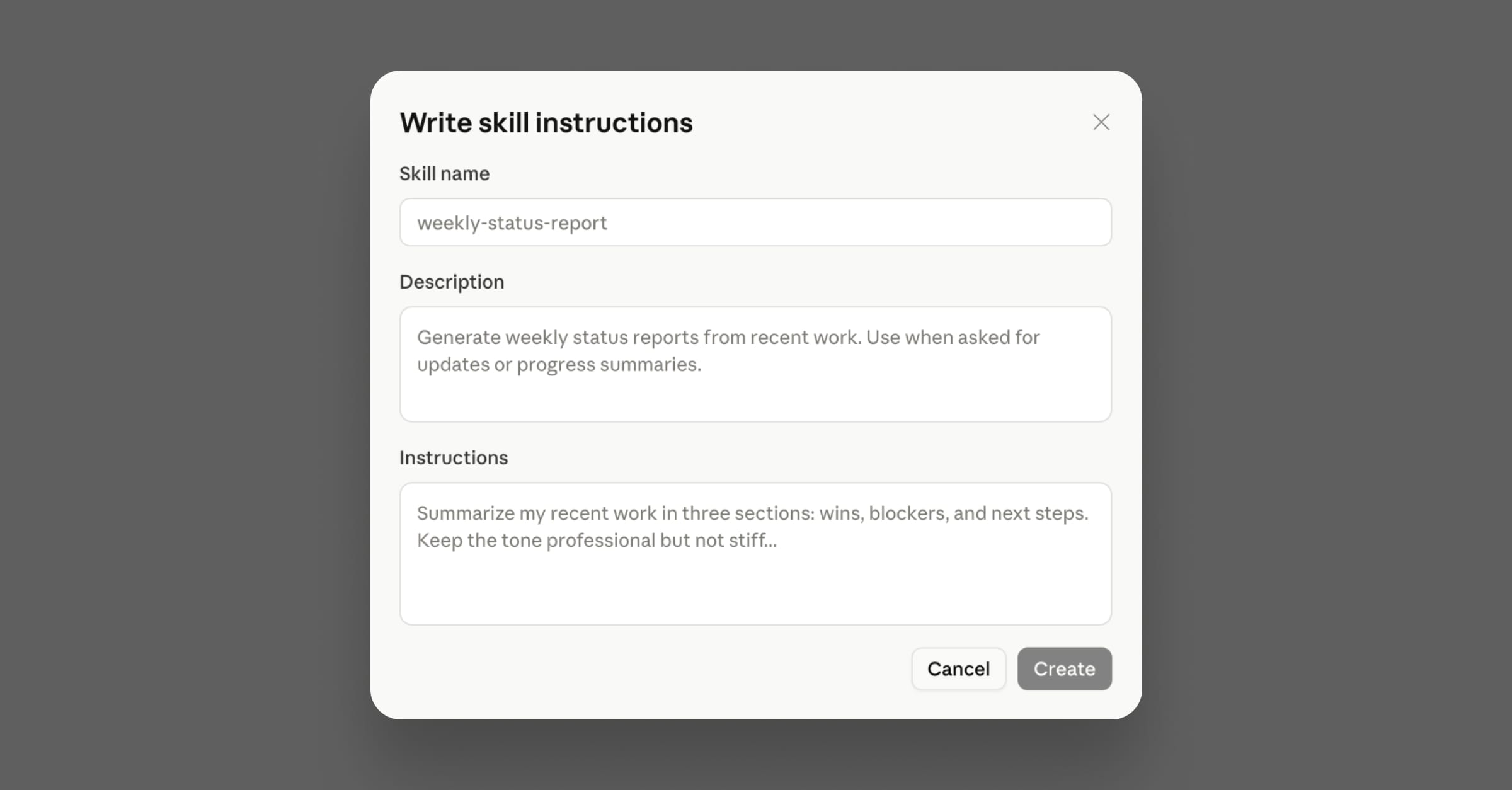
You can create Skills for your browser instance of Claude by heading to Customize and writing them into the text windows provided. No markdown knowledge needed!
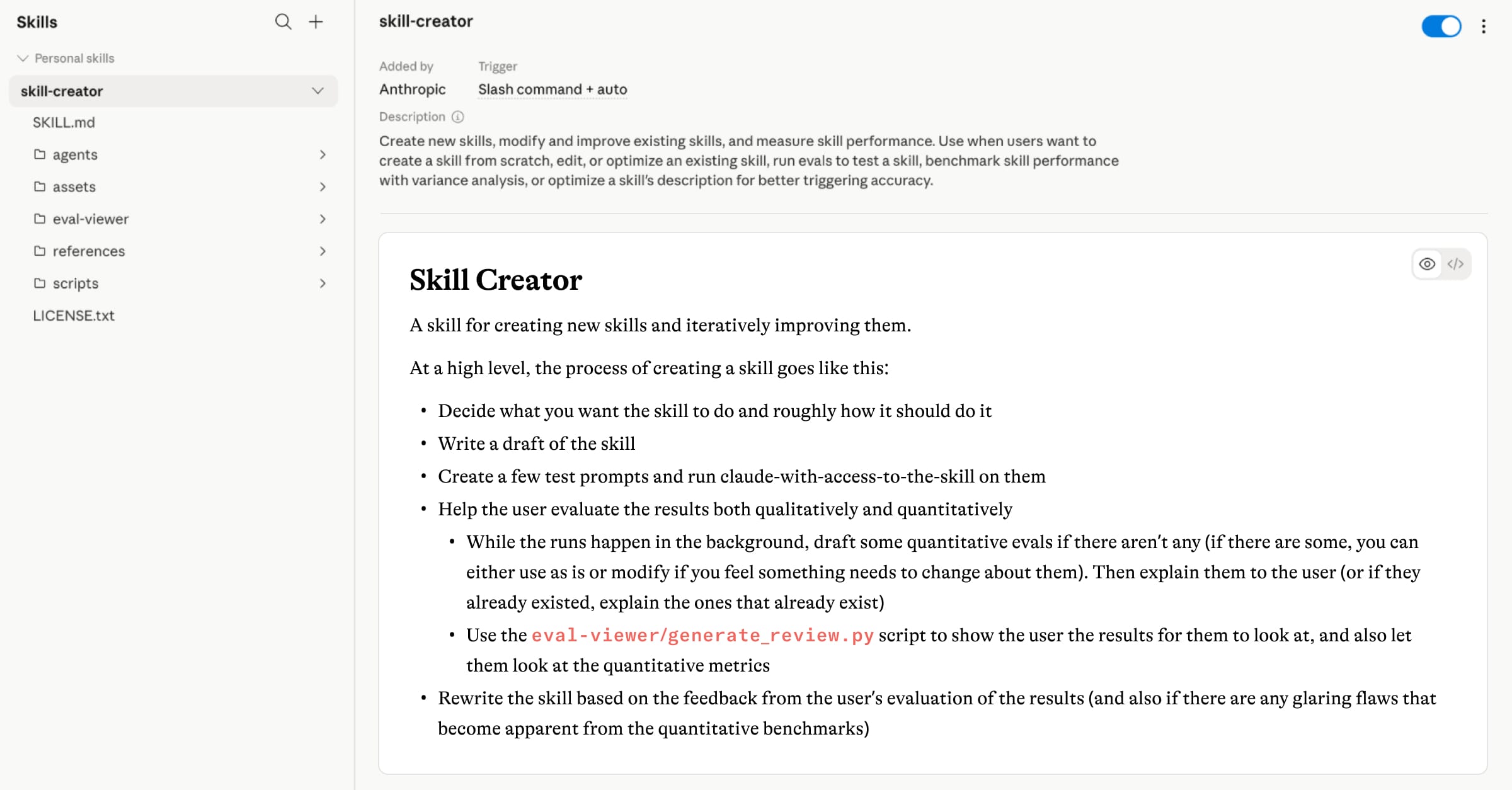
All you need to do is write your instructions, and Claude will save the skill and handle the rest. You can create one manually as pictured below:
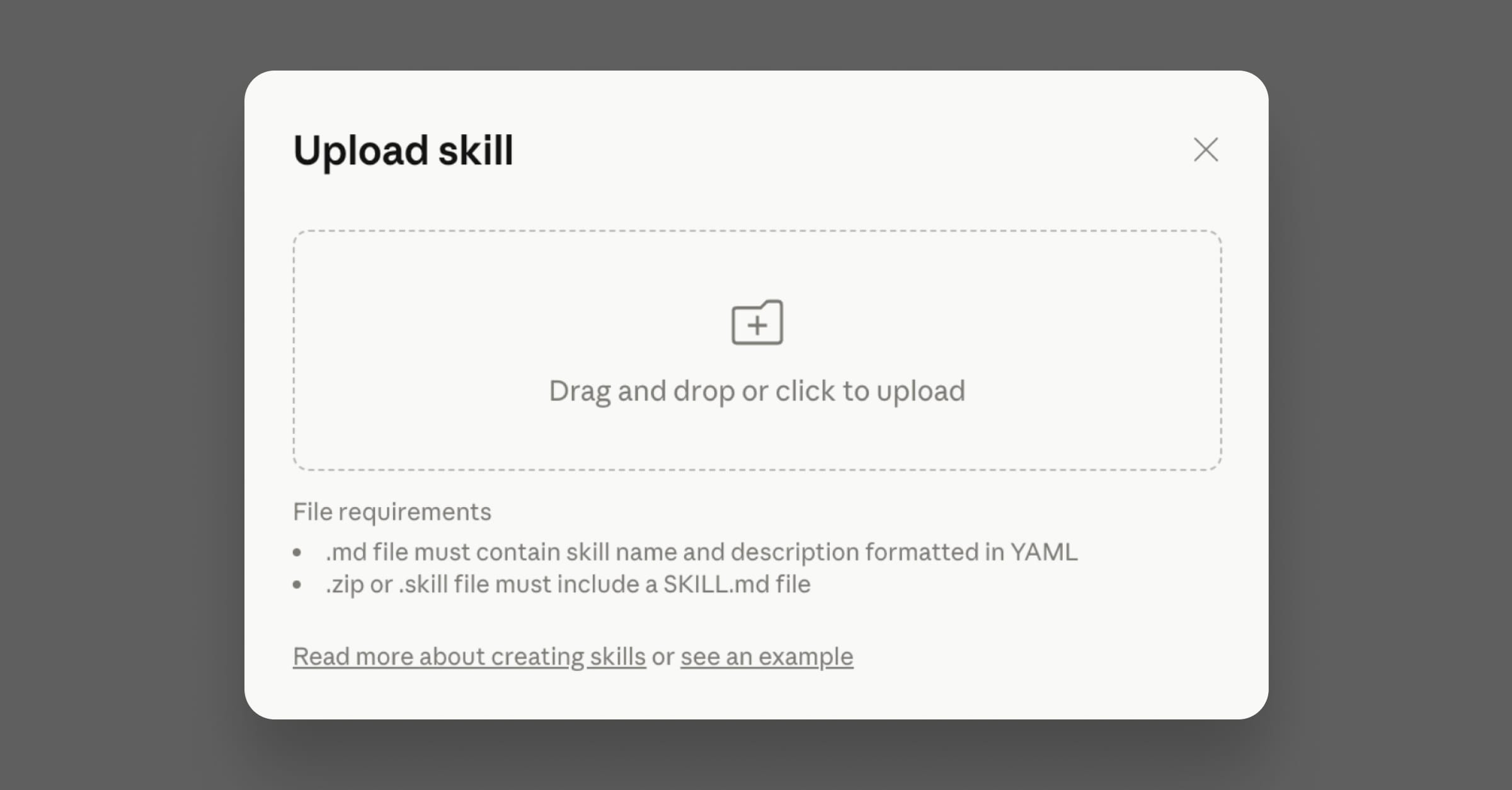
Or use the “Create with Claude” option for AI-powered assistance. This is a great “entry-level” way to create and use Claude Skills. If you download the SKILL.md files we’ve included in this post, then you can upload those directly to Claude to bypass the above.
How to Create and Use Claude Skills for Cowork or Code
If you want a more advanced use case for skills, then creating and using them with Claude Code and Cowork are great ways to power up your CS workflows.
You could write a Claude Skill from scratch in a text file on your computer (using this handy Markdown guide), or you could ask Claude for help. Claude Cowork will have the same skill-creation experience as Claude in the browser, but Claude Code will require raw Markdown files (though Claude Code can help you write them).
Ultimately, there’s no “right” answer here. It depends on your workflows and what you want Claude to do. Claude Cowork and Code will have access to files on your computer, can access your browser windows to automate tasks, and can run scheduled tasks, making them more suitable for advanced CS workflows. But you can start small with the browser version of Claude and work your way up.
5 Claude Skills For Customer Success
Alright, we got the most technical part of the article out of the way. Still with us? Let’s get to what you came here for: how to use Claude skills in your workflow.
We’re covering the five skills below at a high level, but we've created a downloadable Markdown pack of the same skills so you can use them with Claude. Browse them below and download them to see them in action!
Pre-Call Account Brief
Pre-call prep is one of the biggest time sinks in a CSM’s week. Between digging through your CRM, pulling recent support tickets, checking product usage, and skimming the last few email threads, 20 minutes can disappear before you’ve written a single word.
A pre-call brief skill turns that into a two-minute task.
Set your skill with the following information:
- Renewal date
- Last interaction
- Open action items
- Usage highlights
- Red flags
- Context about your role and what you want to see surfaced
Then, before a call, paste in what you have on the account, and Claude generates a structured brief you can scan on the way into the meeting.
Remember: the output is only as good as the information you put in. If you’ve got decent notes in your CRM and a few recent data points, this skill pays for itself on the first use. And if you’re running your accounts in an AI-powered CSP like Vitally, the product usage data, health scores, and interaction history are already in one place, which means feeding the skill is a matter of copying from one dashboard instead of five.
Post-Call Follow-Up Email
Here’s a scenario that probably feels familiar: you end a call with good intentions, three pages of rough notes, and a calendar notification for your next meeting in 12 minutes.
When’s that follow-up email going to be written? Automate that with a Claude Skill that takes in the following:
- Call notes
- A transcript, if possible
- Account notes
Claude can turn that into a polished email with a recap, clear action items, and a warm closing. Make sure to paste the raw transcript or call notes rather than summarizing first. The more material Claude has to work with, the better the output.
QBR Preparation
Every CSM knows the core story they want to tell, but translating that into a polished narrative that gets buy-in is a different story. Automate it with a Claude Skill, or even a series of Skills.
Feed the following information:
- Your product’s core value pillars
- The QBR structure your team uses
- Specific instructions to lean on the actual data you provide rather than making things up.
When it’s time to prep, you paste in usage highlights, key wins from the quarter, open risks, and expansion goals, and Claude builds out a first draft. It won’t write the whole QBR for you, and it shouldn’t. What it does is handle the structural work so you can spend your time on the part that only you can provide: the human-driven relationship with your account.
Churn Risk and Renewal Prep
Most Customer Success Managers have a sense when an account is at risk before they can fully articulate why. You just need structure to make these insights actionable.
A churn risk and renewal prep skill helps you translate what you’re sensing into something you can act on and communicate clearly. Load the following data:
- Product usage
- Support conversation sentiment
- Health scores
- NPS and other survey data
- Any other signals you’ve flagged as churn risks
Before a renewal meeting or a check-in, paste in what you’re observing: usage data, recent support interactions, engagement patterns, and any personnel changes on their side.
You’ll end up with a set of talking points for the renewal conversation, including the harder ones. For teams using Vitally, the health scores, NPS responses, and product usage data you’d paste in are already tracked automatically. That way, you’re translating existing signals into a conversation plan, not assembling the picture from scratch.
Proactive Outreach
Proactive outreach is one of the highest-value things a Customer Success Manager can do. It’s also the first thing to go when your day fills up with reactive work.
You know you care; it’s just a matter of finding time to write personalized, genuine emails that your accounts will actually appreciate.
A proactive outreach skill reduces that friction for you to a matter of button clicks. First, decide what type of outreach this is (onboarding check-in, milestone notes, feature announcements, re-engagement nudges), and feed Claude with information about the account and past top-performing emails. When it’s time to reach out, you drop in the account context and get a draft in seconds.
To be clear: this isn’t “AI sends emails for you.” You’re reviewing every email before it goes out. You’re still the one building the relationship. The skill just removes the blank-page problem, so the email actually gets sent.
Download the Claude Skills Pack
Claude Skills are the best way to level up your Claude outputs, which means they’re a big step toward automating your workflows and taking as much as possible off your plate.
But you still need to write those Skill files. The above is a taste of what you can do with Claude Skills. We turned the above skill descriptions into detailed Markdown files that you can use with Claude in the browser, or straight away with Claude Code and Cowork.
Click the button below to get a link to the files, upload them to Claude (either in the browser or in Cowork), and start automating your work so you can focus more on building relationships with your top accounts.
Table of Contents
Request a Demo

Request a Demo
Request a Demo