Overview
Value
Customers increasingly expect their vendors to prove value in terms of outcomes, not activity. Most CS teams know this, but outcomes end up scattered across call notes, spreadsheets, and memory, which makes it hard to show a customer what they actually achieved and why it mattered to their business.
This blueprint gives your team one consistent place to define, track, and close out outcomes for every customer. Each outcome captures what success looks like, how it will be measured, who it matters most to, and what the result was once it is achieved. That record becomes the backbone of your QBRs, value reviews, and renewal conversations, so CSMs can speak to executive stakeholders with evidence instead of anecdotes.
High-Level Strategy
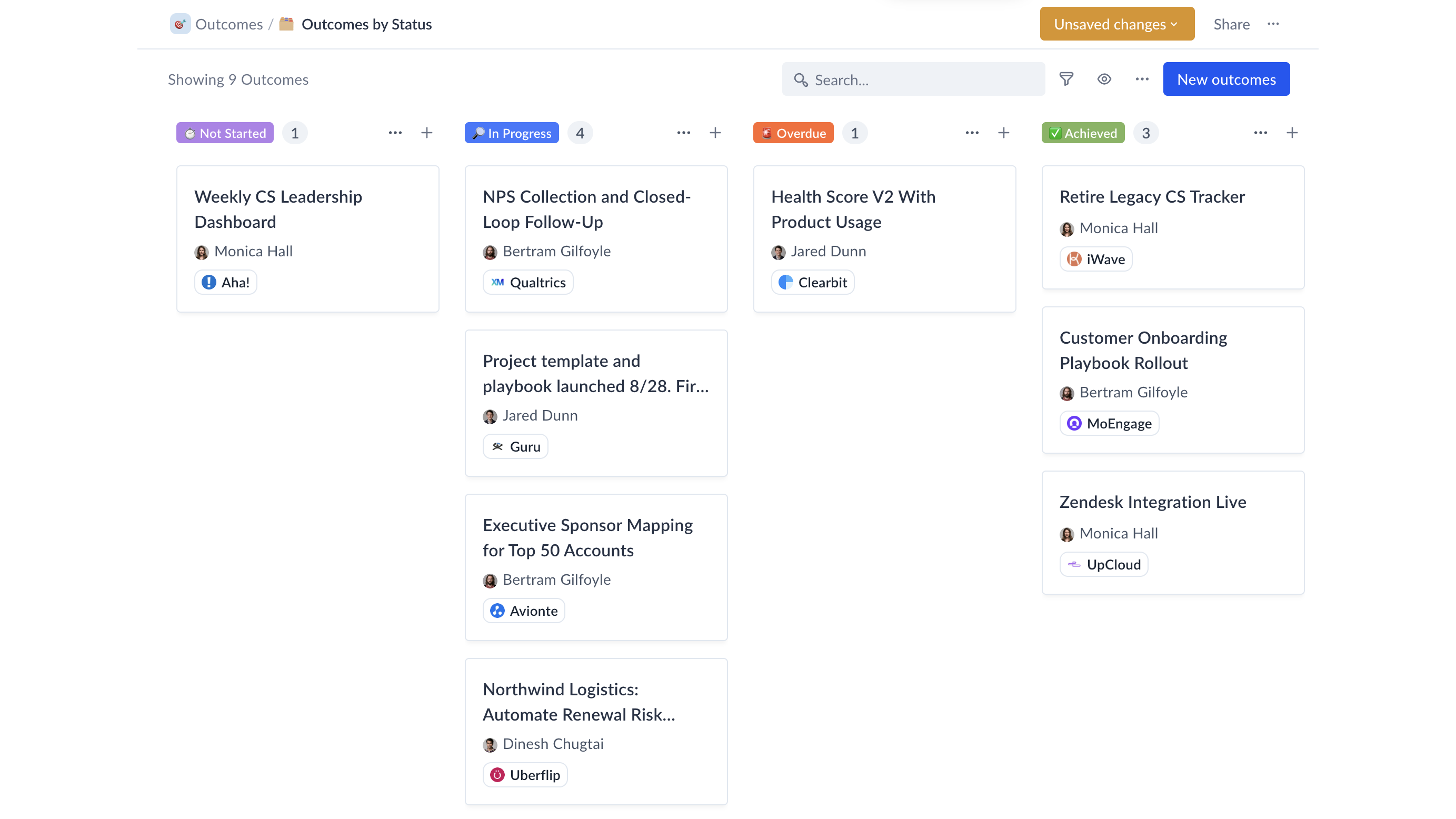
The blueprint creates an Outcomes custom object attached to your Accounts or Organizations, with a standard set of traits covering the full outcome lifecycle: description, category, priority, status, primary owner on the customer side, how success is measured, next steps, target and actual completion dates, and completion notes.
A single dashboard serves both CSMs and leadership. The top section surfaces what needs attention now: overdue outcomes, stuck outcomes, and open outcomes without a target completion date. Below that, an overview shows open, in progress, and not started outcomes, outcomes due in the next 90 days, a status breakdown, and open outcomes by CSM. A completed outcomes section tracks achievements this quarter and all time, plus a quarterly achievement leaderboard. CSMs filter it to their own book to plan their day; team leads use it unfiltered for a team-wide view.
The recommended success standard is simple: every customer has at least one tracked outcome with a target completion date.
Technical Guidance
- Requires one available custom object. If you have already used all of your included custom objects, please reach out to us about increasing your limit.
What's Included?
- Outcomes Hub
- Outcomes Dashboard View (Attention, Overview, and Completed Outcomes sections)
- Outcomes by Status Board View
- Team Doc with information on how to use Outcomes use case
- Outcomes custom object
- Custom Object Traits: Description, Category, Priority, Status, Primary Owner, Measured By, Next Steps, Next Step By, Target Completion, Actual Completion, Completion Notes, Days Since Creation (formula), Days to Completion (formula)
- Playbook: Outcome Achieved > Set Completion Date to 'Today’
- Playbook: Set Outcomes Status to Overdue On Completion Date

Ready to Scale Your Customer Success?